

I recently needed to scrape a site built on Next.js. My first attempt returned nothing. My second attempt returned data, but every field was "Unknown". Neither failure was obvious. Both had completely different root causes.
Here is a deep-dive into what happened:
Attempt 1: Using Apify’s prebuilt scrapers
I went to Apify first. They have a marketplace of pre-built scrapers, and I figured someone had already solved for my website. Two actors existed for it. One was broken. The other was going to cost more than I wanted to spend for a side project. So I decided to build my own.
Attempt 2: The requests library
My first instinct was the standard Python requests library. Fetch the page, parse the HTML, extract the data.
It didn’t work.
The website I was scraping is a Next.js app. What requests gets back is an HTML shell, a near-empty placeholder. The actual content never loads because it requires JavaScript to run first. requests doesn’t run JavaScript. You get the skeleton, not the page.
To actually get the data, I needed something that would behave like a real browser: open the page, execute the JavaScript, wait for the content to hydrate, and read the result.
That meant Playwright.
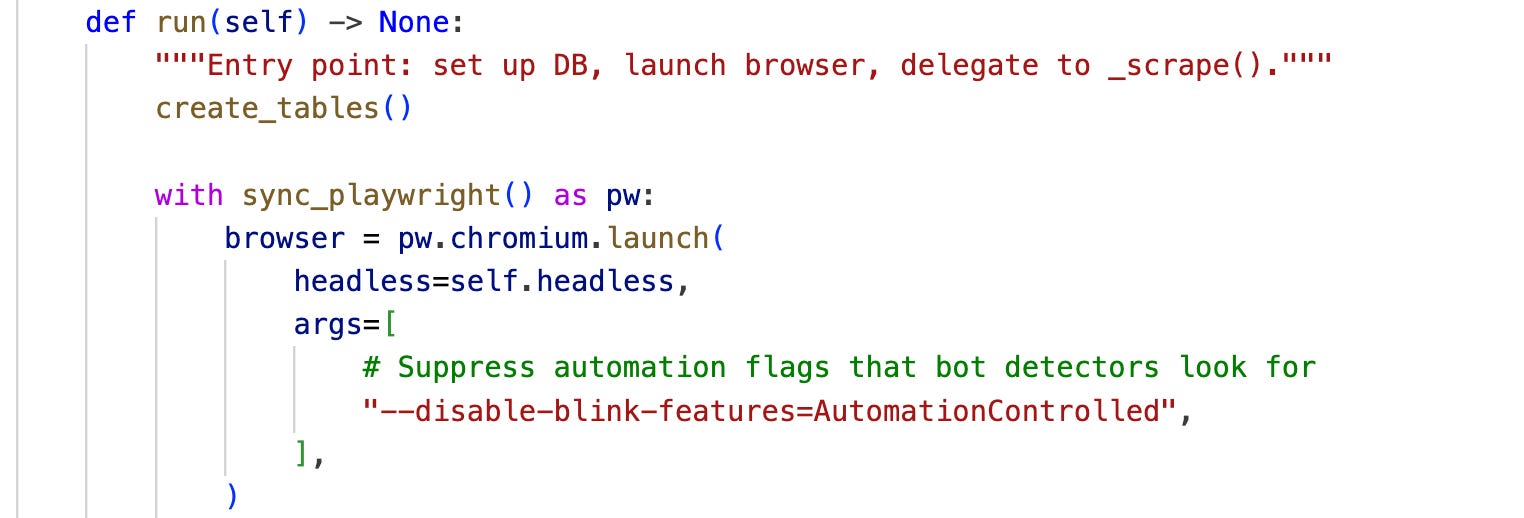
--disable-blink-features=AutomationControlled flag is one of several signals headless Chrome exposes by default. Removing it is table stakes for not getting blocked.Attempt 3: Playwright fixes the rendering problem. Then a silent failure appears.
Playwright is a headless browser library. It opens Chromium, loads the page, runs the JavaScript, and gives you the fully rendered DOM.
What is the DOM? The DOM (Document Object Model) is the live, structured representation of a webpage that the browser builds after running all the JavaScript. Think of the raw HTML as a blueprint and the DOM as the actual building. When people say “scraping a page,” they usually mean reading from the DOM, not the raw HTML file.
Problem solved, or so I thought.
The scraper ran. No crashes. Data was flowing into the database.
Except every single field was coming back as "Unknown".
This is the worst kind of bug. There was no exception, no stack trace, no error message. The code worked perfectly. It just returned nothing useful. I only caught it because I looked at the actual data.
I added a debug script that dumped the raw HTML to a file. When I read it, I found that the website had quietly removed all their data-test attributes. My CSS selectors were finding nothing because those attributes no longer existed.
What are
data-testattributes? They are custom HTML attributes that developers add to elements specifically for testing and scraping purposes, things like<div data-test="name">Bella</div>. They’re convenient hooks because they are stable and semantic. The problem is that sites can remove them at any time, and when they do, any scraper relying on them breaks silently.
While I was in the raw HTML, I noticed something else. The website, being a Next.js app, embeds the full page data into a <script id="__NEXT_DATA__"> tag on every page.

This is a key architectural point worth understanding:
Next.js serializes the entire page’s data as a JSON blob and ships it inside the HTML, so the client-side JavaScript can immediately hydrate the app without making a second network round-trip to fetch the data. The __NEXT_DATA__ blob exists because Next.js needs it to function. That is exactly why it is stable.
I switched from CSS selectors to reading that JSON blob directly. Websites can reshuffle their HTML, rename their CSS classes, and strip their data-test attributes whenever they want. The __NEXT_DATA__ structure is what powers the app itself. It doesn’t change arbitrarily.
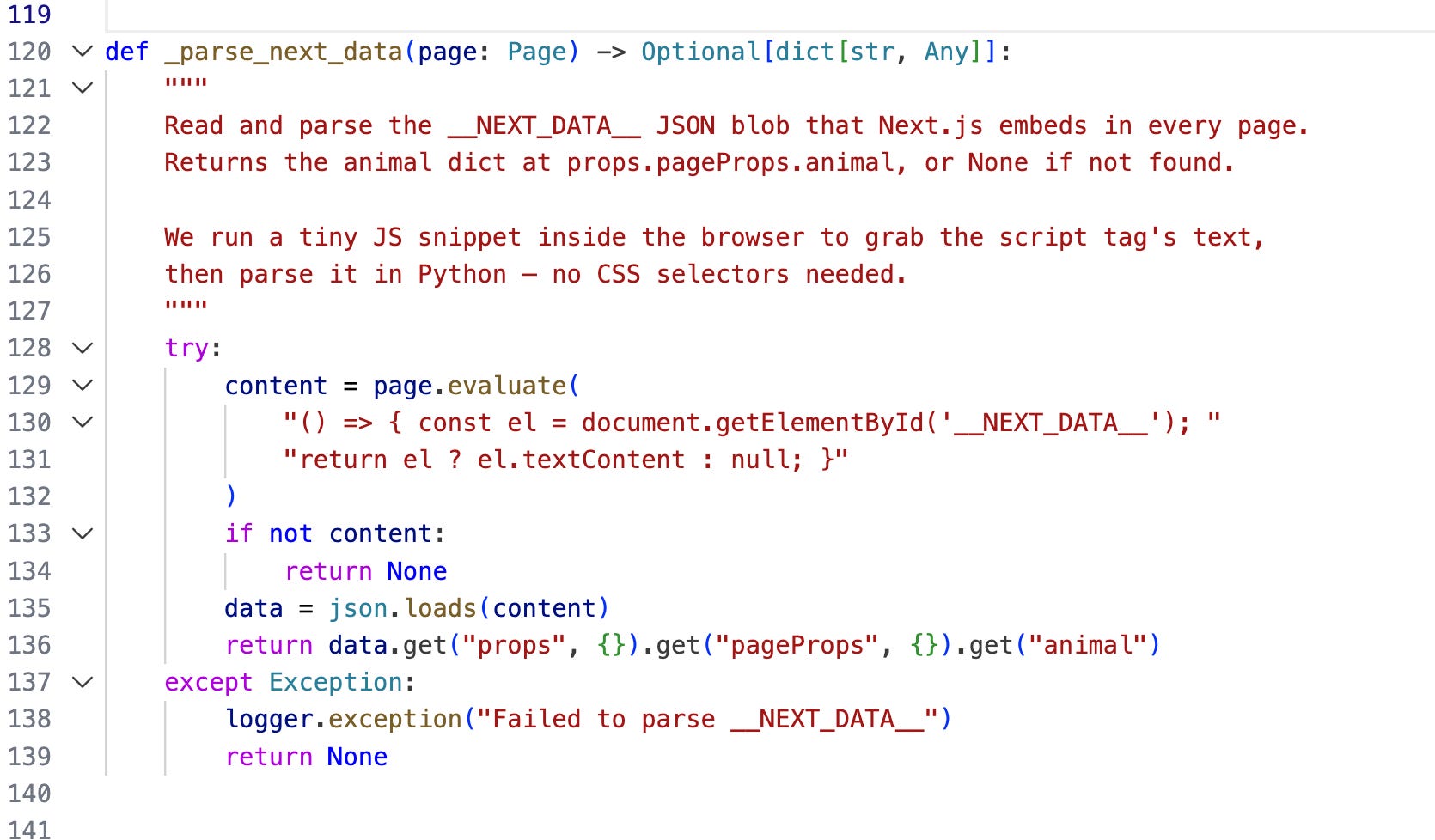
…silent failure fixed
Attempt 4: Bot detection
After fixing the data extraction, I was still getting blocked. Playwright in default headless mode is detectable. Here’s why.
When a real browser connects to a website, it broadcasts a lot about itself: this is called the browser fingerprint. It includes things like:
The list of browser plugins and extensions installed
Screen resolution and color depth
Font rendering and canvas drawing behavior
The value of
navigator.webdriver, a JavaScript flag that istruein automated browsers andfalsein real onesTiming patterns: how fast pages load, how long between requests, whether a mouse moved before a click
Playwright out of the box fails almost all of these checks. It has no plugins installed (real Chrome always has some), it sets navigator.webdriver to true, and its timing patterns look robotic because they are.
Three things fixed it:
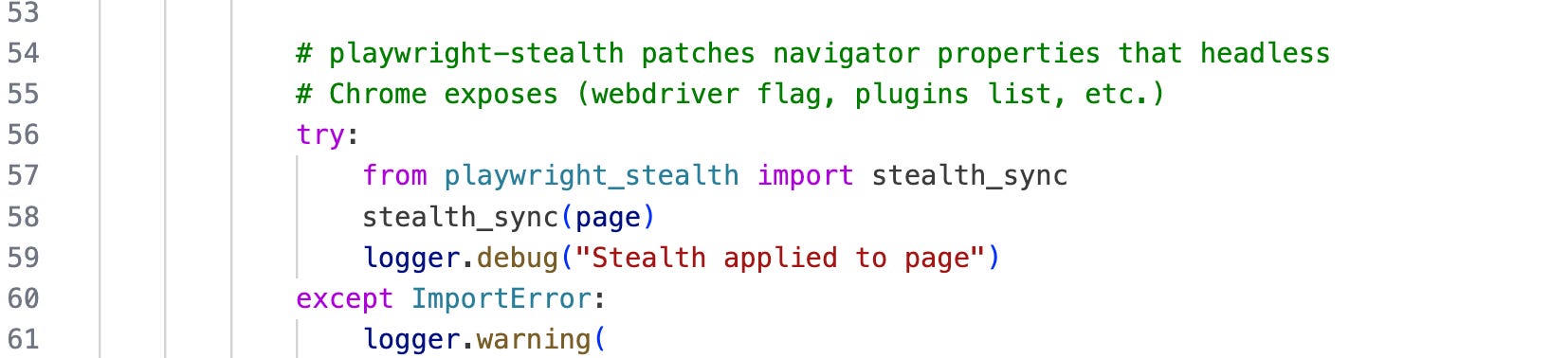
playwright-stealth: a library that patches all of this. It sets navigator.webdriver to false, injects a realistic set of fake browser plugins, and smooths out the timing and rendering signals that expose an automated browser.
headless=False: instead of running invisibly in the background, I let an actual Chrome window open and scroll through pages visibly. This leaves a genuinely human-looking fingerprint because it is, in many ways, a real browser doing real things.
I had noticed that while Claude cannot access many websites when browsing headlessly, the Claude Chrome extension handles those same sites fine, because it controls an actual browser window, takes screenshots, and interacts with pages the way a human would. The usage pattern reads as human because the mechanism is human. I applied the same logic here.
Synchronous requests: I deliberately avoided async scraping. Hitting multiple pages in parallel looks like a traffic burst, which is a classic bot signal. Running one page at a time with randomized delays between requests reads as human browsing. Time was not a constraint for this project, so the slower approach was the right call.

The lesson
The CSS selector failure was more instructive than the bot detection problem. Bot detection is a known, documented problem with known solutions. But a scraper that silently returns empty data -- that will sit in your database for days before you notice anything is wrong.
Next.js apps change their HTML structure. They do not change their internal data contracts. When you are scraping a Next.js site, look for __NEXT_DATA__ first. It is more stable than anything on the surface of the page.
If you’re building something similar or just want to see how the pieces fit together, the full codebase is on GitHub at github.com/shrutiagarwal28. The scraper, the Pydantic models, the upsert logic -- it’s all there.
And if you’ve hit a similar wall scraping a modern JavaScript-heavy site, I’d genuinely like to hear how you solved it. Drop a comment or find me on LinkedIn.